
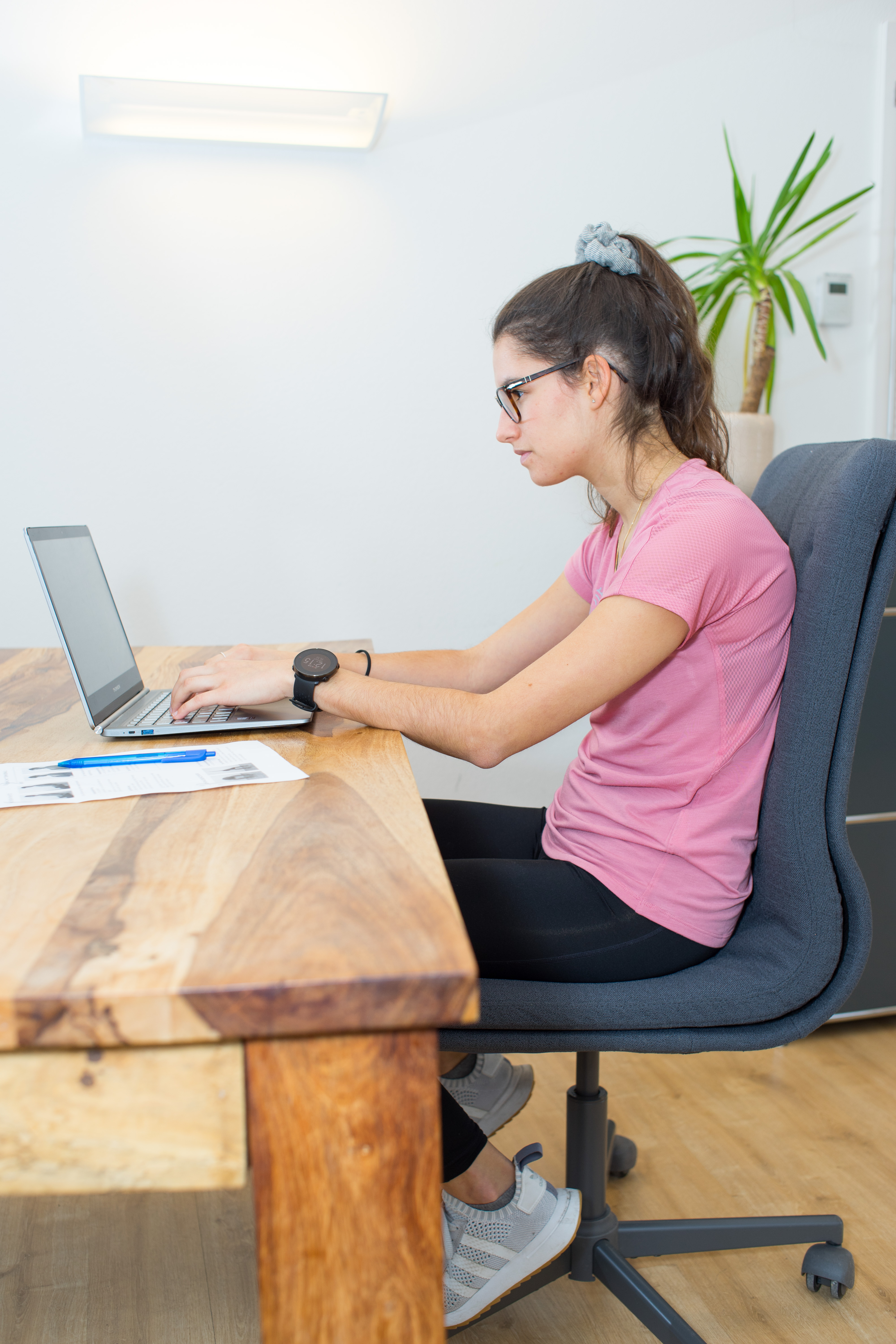
Ergonomic working from home: staying healthy, focused and pain-free
For many people, working from home has long been part of normal working life. Hybrid working models and smart working bring flexibility, save commuting time and allow more freedom. At the same time, working from home presents our bodies with new challenges.
A home workspace is often not set up as ergonomically as a professional office. The laptop sits on the kitchen table, meetings happen from the sofa and sometimes people even work in bed. What feels comfortable in the short term can, over time, contribute to neck, shoulder and back pain.
Ergonomic working from home therefore doesn't mean sitting "perfectly straight" all day. It means setting up your workspace and shaping your day so that your body is supported as well as possible, with a healthy posture, regular movement and short breaks to give your body some relief.

WHAT DOES ERGONOMIC WORKING FROM HOME MEAN?
Ergonomics means adapting your workspace to your body, not the other way round. The aim is to reduce strain, allow natural movement and prevent discomfort.
Especially at home, many people work with:
- a laptop,
- a tablet,
- a smartphone,
- an unsuitable table height,
- a chair that can't be adjusted,
- or a screen that sits too low.
As a result, the body quickly slips into unfavourable positions:
- head pushed forward,
- shoulders hunched up,
- rounded back,
- bent wrists,
- or prolonged sitting without movement.
Over several hours, this can lead to discomfort.
YOUR BACK: A COMPLEX SYSTEM
Your back is a strong but sensitive interplay of:
- vertebrae,
- intervertebral discs,
- muscles,
- ligaments,
- fascia,
- nerve pathways.
It is designed to let you move, to stabilise you and to absorb load. It becomes a problem when it has to stay in one-sided positions for a long time.
If your workspace is poorly set up, the load on your body becomes uneven. At first this may feel like mild tension, later it can turn into pain, stiffness or persistent tightness.
TYPICAL COMPLAINTS CAUSED BY A POORLY SET-UP WORKSPACE
Common symptoms are:
- neck and shoulder tension,
- pain in the wrists, elbows or shoulders,
- headaches,
- eye strain,
- lower back pain,
- tiredness,
- difficulty concentrating,
- a general feeling of stiffness after sitting for a long time.
Many people only notice at the end of the working day how much their posture has affected their body.
WHAT CAN YOU DO YOURSELF FOR AN ERGONOMIC WORKSPACE?
FIND THE RIGHT SITTING POSITION
An ergonomic workspace starts with the right settings for your chair, desk and screen.
Pay attention to the following points:
Head
Keep your head as neutral as possible. Your chin is slightly tucked in and your gaze goes straight ahead.
Back
Your spine should keep its natural S-shape. Sit upright, but not rigidly.
Screen
The screen should be at eye level and about an arm's length away.
Shoulders
Your shoulders stay loose and relaxed, drawn down.
Arms
Elbows at an angle of about 90–100°. Your forearms rest in a relaxed way on or close to the work surface.
Wrists
Your wrists should stay as straight as possible and not be bent for long periods.
Legs
Hips and knees are at roughly a 90° angle. Both feet are flat on the floor.
Desk height
The desk height should be set so that your arms can rest comfortably without you hunching your shoulders.

AVOID CLASSIC POOR POSTURES
Typical poor postures when working from home are:
- a hunched back,
- head pushed far forward,
- screen too low,
- elbows bent too much,
- chair too high or too low,
- working from the sofa or bed,
- hunched shoulders.
These positions can put a lot of strain on the neck and upper back, shoulders, elbows and wrists. Over the long term, they can lead to tension, pain and muscle shortening.
ERGONOMICS WHEN USING YOUR SMARTPHONE
Your smartphone also plays a big part. Many people spend a lot of time every day with the head tilted forward and the upper back rounded.
Typical poor postures:
- head bent far forward and down,
- head pushed forward,
- rounded thoracic spine,
- shoulders pulled forward,
- arms bent sharply.
Better:
- hold your smartphone at chest or eye level,
- support your elbows on the table,
- take your shoulders back and let them relax,
- keep your head as neutral as possible,
- take regular breaks.

BUILD IN MOVEMENT AND BREAKS
Ergonomics doesn't mean sitting perfectly for hours. The best workspace won't help much if you hardly move.
Build movement in regularly:
- stand up briefly every 30 minutes,
- walk while you're on the phone,
- switch between sitting and standing,
- use your lunch break for a walk,
- plan in short stretching exercises,
- drink water regularly.
Small movement breaks often work better than a single long workout in the evening.
EXERCISES FOR A HEALTHY BACK WHEN WORKING FROM HOME
These exercises help to release tension, promote circulation and take the strain off your muscles. Do them slowly and in a controlled way, never beyond strong pain.
1. NECK EXTENSOR STRETCH
How to do it:
- Sit upright on a chair.
- Slowly move your chin towards your chest.
- Rest your hands loosely on the back of your head.
- Apply gentle pressure.
- Keep breathing calmly.
Hold time:
- 20–30 seconds
- 3 repetitions
2. SIDE NECK STRETCH
How to do it:
- Sit upright.
- Tilt your head to the right.
- Your left hand holds on under the chair or gently pulls the shoulder down.
- With your right hand you can add a light pull on the head.
- Then switch sides.
Hold time:
- 20–30 seconds
- 3 repetitions on each side
3. THORACIC SPINE MOBILISATION
How to do it:
- Sit upright.
- Cross your arms in front of your chest.
- Slowly turn your upper body to the left and right.
- Hold the end position briefly.
Recommendation:
- 10 repetitions on each side
4. SHOULDER STRENGTHENING
How to do it:
- Stand upright.
- Stretch your arms out to the sides.
- Make small circular movements with your arms.
- First forwards, then backwards.
Recommendation:
- 20 seconds
- 3 sets
5. BACK EXTENSOR STRETCH
How to do it:
- Sit on the edge of the chair.
- Place your feet hip-width apart.
- Slowly bend your upper body down between your legs.
- Let your arms hang loosely or support them on the floor.
Hold time:
- 20–30 seconds
- 3 repetitions
6. UPPER BACK AND SHOULDERS
How to do it:
- Stand upright.
- Clasp your hands behind your back.
- Gently draw your shoulder blades together.
- Stretch your arms back and down.
- Open your chest slightly.
Hold time:
- 15–20 seconds
- 3 repetitions
These exercises take only a few minutes, but they can make a big difference, especially if you build them into your working day regularly.
WHAT CAN PHYSIOTHERAPY DO FOR HOME-OFFICE-RELATED COMPLAINTS?
Even if you set up your workspace well, discomfort can still develop. This is especially true if tension has been present for a while or unhelpful movement patterns have crept in.
In physiotherapy, we don't just look at the point of pain, but at your whole daily life:
- How do you sit?
- How do you move?
- How is your workspace set up?
- Which muscles are overloaded?
- Which structures need more strength or mobility?
HOW WE SUPPORT YOU AT KINEO
We help you with:
Manual therapy
Targeted techniques to release blockages and improve mobility.
Soft tissue techniques
Treatment of tense muscles and fascia.
Trigger point treatment
Releasing painful muscle knots.
Posture analysis
Identifying unfavourable movement and sitting patterns.
Ergonomic advice
Individual tips for setting up your home workspace in the best possible way.
Exercise programme
Tailored exercises for strengthening, mobilisation and relief.
Our aim is not just short-term pain relief, but a working day in which you feel freer, more relaxed and more resilient again.
CONCLUSION
An ergonomically set-up workspace at home is the basis for healthy working. But movement, breaks and a conscious approach to your body are just as important.
With:
- a good sitting position,
- a correctly adjusted screen,
- ergonomic smartphone use,
- regular movement breaks,
- and targeted exercises
you can prevent many typical complaints.
If pain or tension remains anyway, we support you at KINEO with individual physiotherapy, ergonomic advice and a suitable exercise programme.
That way, your home office becomes not only more flexible, but also healthier.
FAQ: Ergonomic working from home
1. What does ergonomic working mean?
Ergonomic working means setting up your workspace so that your body is supported as well as possible and unnecessary strain is reduced.
2. How high should my screen be when working from home?
The screen should be roughly at eye level and about an arm's length away.
3. Is sitting generally bad?
No. The problem is mainly sitting for a long time without moving. Changing position regularly is what matters.
4. How often should I take movement breaks?
Ideally, stand up briefly, move around or change position every 30 minutes.
5. When should I see a physiotherapist?
If discomfort lasts longer, keeps coming back or limits your working day, a physiotherapy assessment makes sense.